

Legal · SMS program
Texts that do work. Never marketing.
Rivolq sends transactional and operational SMS only: verification codes, work-order assignments, maintenance alerts, and account notifications. This page explains how you opt in, what you’ll receive, and how to stop.
Purpose
Transactional & operational
No advertising or marketing
Frequency
Varies with your activity
Message & data rates may apply
Opt out
Reply STOP
One confirmation, then silence
Help
Reply HELP
support@rivolq.com
01Program description
Transactional and operational messages. Nothing else.
Rivolq LLC (“Rivolq”) is a facilities-maintenance and asset-management platform. Every text relates to your account or your work in Rivolq, and Rivolq never shares your number with third parties for their own messaging.
Rivolq SMS Program
Rivolq LLC sends transactional and operational SMS messages to users who provide their phone number and consent to receive them. Messages may include account verification codes, two-factor authentication codes, password recovery messages, work-order assignments, maintenance alerts, and account notifications. Rivolq does not use this SMS program for advertising or promotional marketing.
Message frequency varies. Message and data rates may apply. Reply STOP to unsubscribe. Reply HELP for assistance or contact support@rivolq.com.
Consent to receive SMS messages is not a condition of purchase.
Account signup
A verification code when you create an account and choose “Text message” as the delivery channel.
Two-factor sign-in
A sign-in code when you have enabled SMS as your two-factor authentication method.
Password reset
A password-reset code when you request a reset by text instead of email.
Confirm a number
A one-time code to confirm a phone number you add under Settings → Security.
Work-order assignments
A notification when a work order is assigned to you, if you have turned on SMS notifications.
Maintenance alerts
Maintenance alerts and account notifications you have chosen to receive by text.
02How you opt in
Consent is a box you check yourself. Never pre-checked.
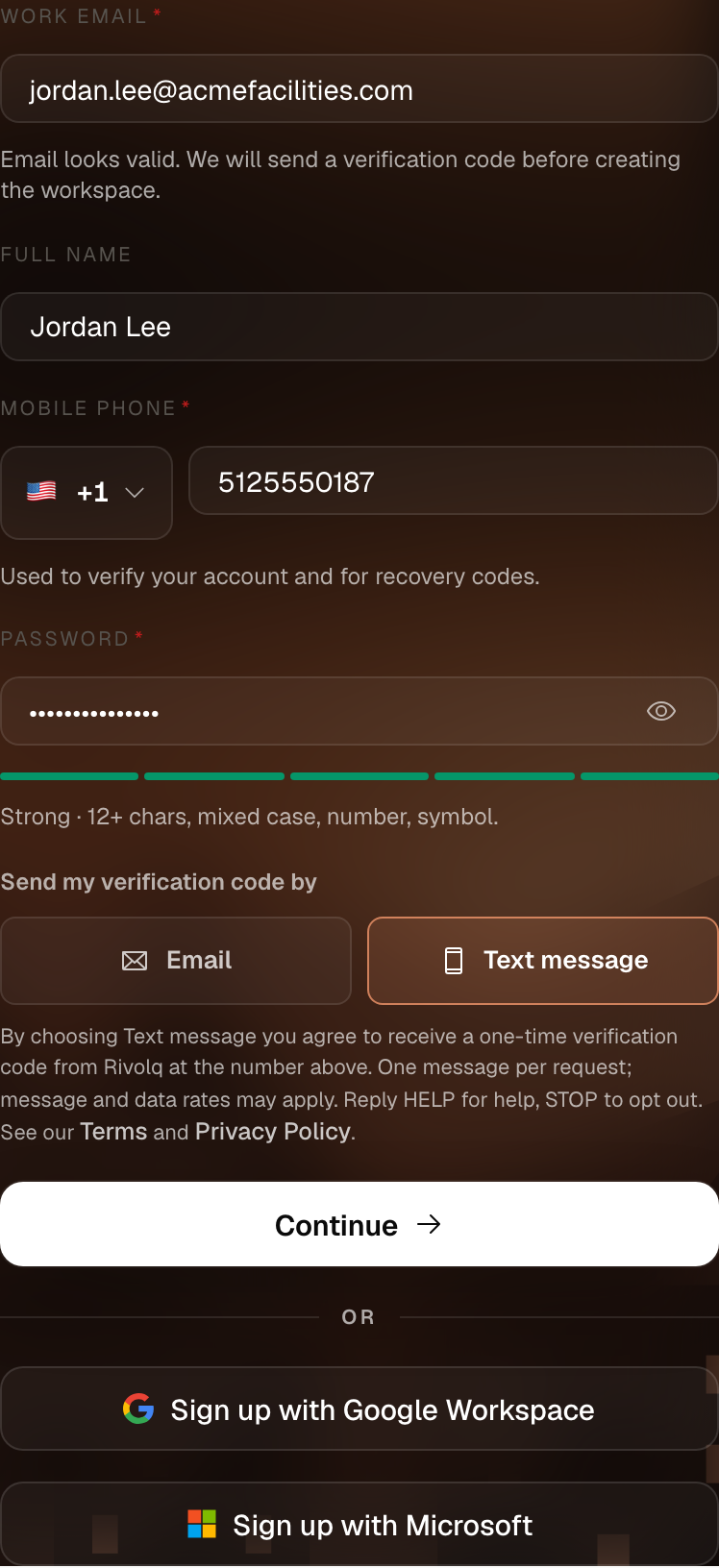
On the account signup form at app.rivolq.com/signup, you enter your own mobile number and give consent by checking a box that is unchecked by default. Rivolq never pre-checks it, and no text is sent until you do. The consent capture looks like this:
The checkbox is unchecked by default. Consent requires an affirmative action and is not a condition of purchase.
Existing users opt in under Settings → Security by entering a phone number and requesting a verification text. A number must be verified this way before Rivolq will ever send a sign-in or password-reset code to it.
03Message frequency & sample
Message frequency follows your own activity.
Frequency varies with how often you request a code and which notifications you have turned on — verification codes are always one message per request, and operational notifications arrive only when the events you subscribed to happen. Message and data rates may apply depending on your mobile carrier and plan.
Sample message
- Sender
- Rivolq toll-free
- Per request
- 1 message
- Code lifetime
- 10 minutes
04Opting out & getting help
Two words do everything.
STOP
Reply STOP to any Rivolq text to opt out.
You will receive one confirmation message and no further texts. You can also remove your phone number at any time under Settings → Security in the Rivolq app.
Consent to receive SMS messages is not a condition of purchase. Opting out means verification codes, work-order assignments, and other notifications will reach you by email instead of text.
05Privacy & terms
Your number is used for this, and only this.
Phone numbers are used only for the purposes above and are handled as described in our Privacy Policy. Use of the Service is governed by our Terms of Service. Carriers are not liable for delayed or undelivered messages.
